If your Telegram account has been hacked, the main thing is not to panic, but to quickly take a few clear steps, preferably within the first 24 hours. This will increase your chances of recovering your account and minimizing losses.
This article provides a simple guide on what to do if your Telegram account has been hacked, how to restore access, and how to set up protection so that this does not happen again.
🔍 Signs that your Telegram account has been hacked
Cybercriminals often try to work quietly, but they almost always leave traces. You should be wary if:
- Messages or mailings that you did not send appear in chat rooms.
- In the Devices section, you may see unfamiliar sessions, cities, or countries.
- Friends write that they receive strange links, “requests for money,” or codes from you.
- The app periodically logs me out of my account for no apparent reason.
- You receive login codes by email or SMS, even though you are not logged in anywhere.
If you see even one of these signs, you should act as if your account has already been compromised.
⏰ First 24 hours: urgent steps
The first few hours after detecting a breach are critical. During this time, you can cut off the attacker from the account and minimize the damage.
🧹 Step 1. Check active sessions
If you can still access Telegram:
- Open Settings → Privacy and security → Active sessions / Devices.
- Review all active sessions.
- Click Terminate all other sessions, leaving only the current one.
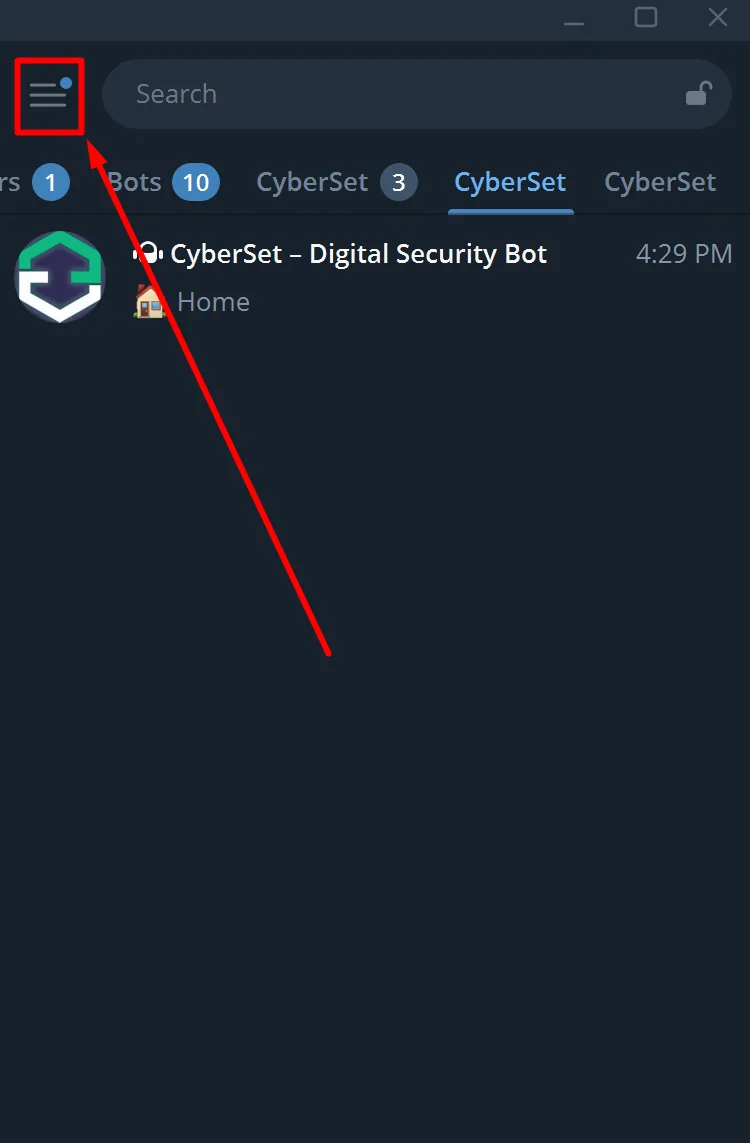
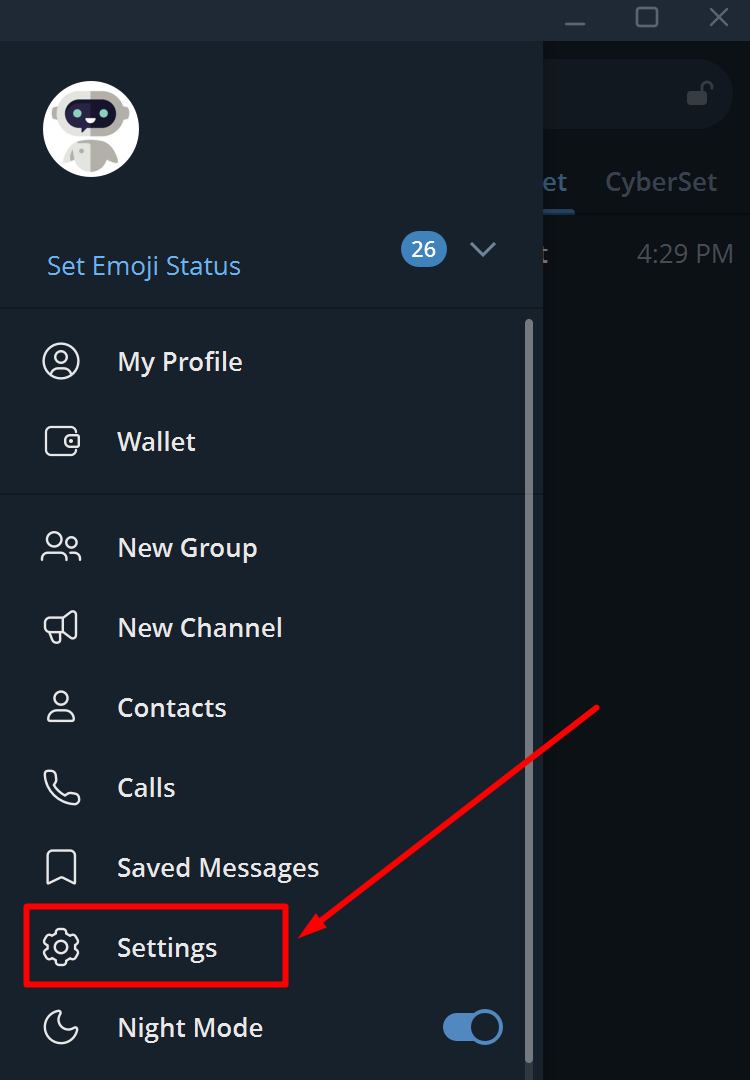
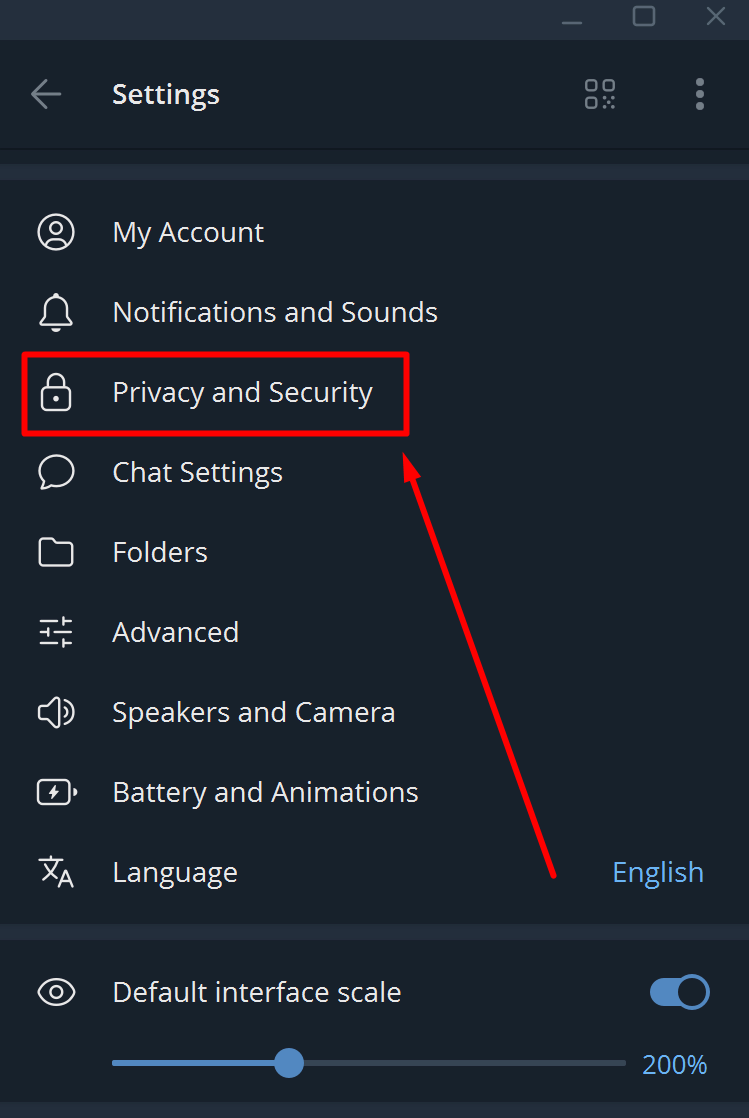
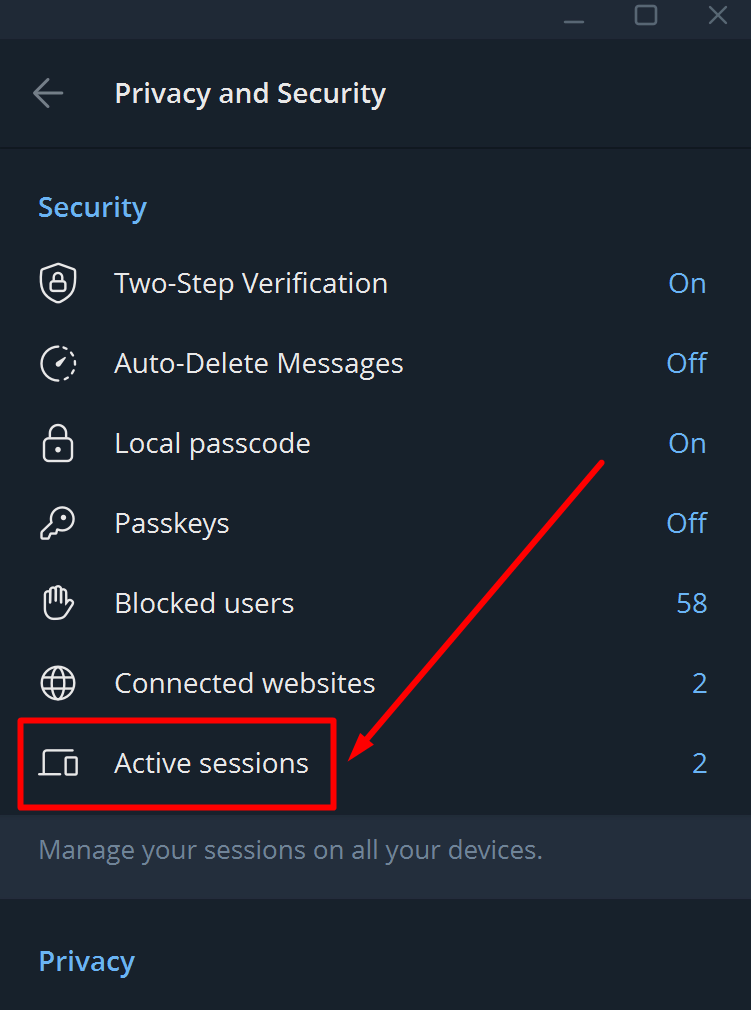
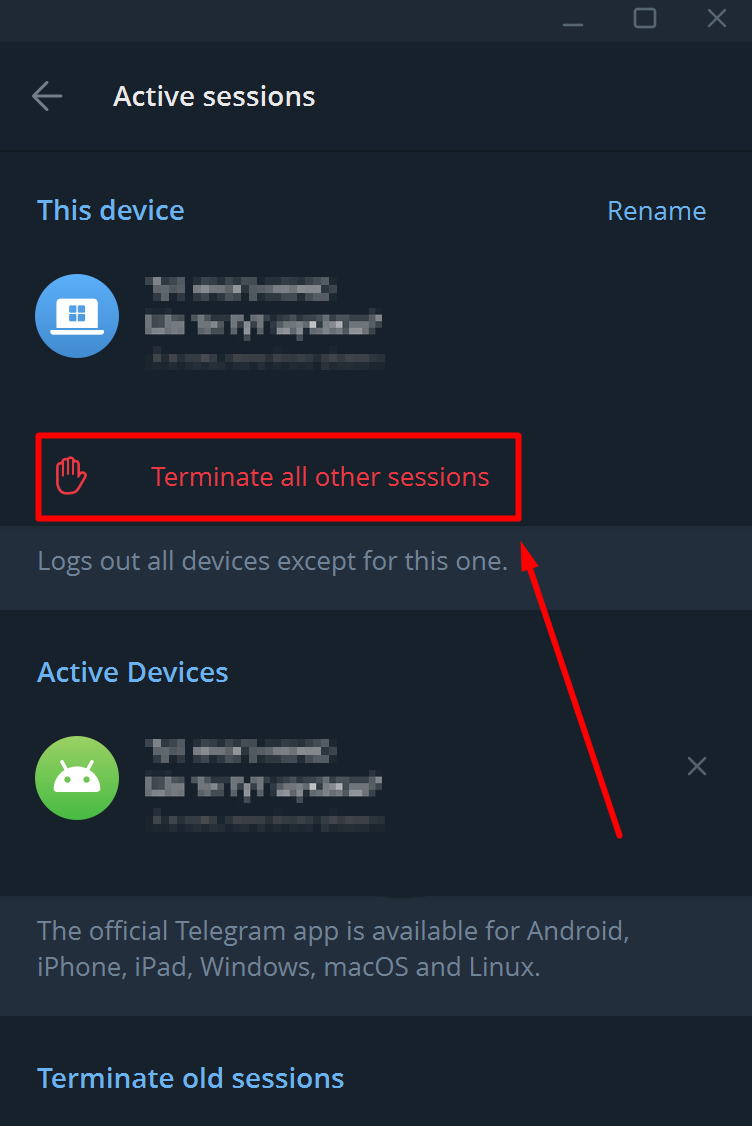
This will remove the intruder from the account on all of their devices.
🔐 Step 2. Change your password and PIN
Telegram has two important levels of protection:
- Lock the app with a password/PIN code.
- Two-step verification (2FA / Two-Step Verification).
What to do:
- Enable app lock:
Open Settings → Privacy and security → Local lock code / Lock code. - Set a secure PIN or password to log in to the app.
- If 2FA was already enabled, change your password; if not, set it up (see the next step).
Your password should be long and unique: at least 12–16 characters, including letters, numbers, and special characters. Use a password manager so you don’t have to remember everything manually.
🛡️ Step 3. Enable two-factor authentication
2FA is one of the most effective ways to protect against hacking through code interception or leaked password databases.
- Open: Settings → Privacy and security → Two-step verification
- Set a separate complex password for login.
- Add a backup email for recovery.
Even if someone intercepts the SMS code, they won’t be able to access the account without the 2FA password.
🧾 Step 4. Check your profile settings
After cutting off unnecessary sessions and changing passwords, check whether the attacker has changed any important settings:
- Has the phone number linked to the account been changed?
- Didn’t change username, photo, profile description.
- Have you been added to any suspicious groups or channels?
If something looks strange, reset your settings, delete suspicious chats, and warn your friends that there has been a hack.
🚪 Can’t log into Telegram: what to do if it’s been hacked
There are situations when access is completely lost: the password has been changed, the code does not arrive, or the number is no longer yours.
📵 Option 1. The code is not coming
There may be various reasons for this:
- No connection or roaming — SMS is physically not delivered.
- The operator delays or blocks delivery.
- A SIM swap attack occurred: the attacker reissued the SIM card to himself.
Try:
- Log in via the Desktop client or Web Telegram if you were previously authorized there.
- Check the status of your SIM card with your operator (whether the number is active and whether it has been reissued without your knowledge).
If the number no longer belongs to you, this is already an incident for the operator and, often, for the police.
🔁 Option 2. Number/email changed, account hijacked
If the fraudster has managed to change the number linked to the account, it becomes very difficult to recover it independently.
What makes sense to do:
- Contact Telegram support via the official form.
- Provide as much evidence as possible that you are the account owner (old number, approximate registration dates, examples of chats, channel names).
- If someone has already requested money on your behalf or used your confidential data, report the incident officially (cyber police, statement, screenshots).
There is no guarantee of a refund, but the more data you provide and the faster you respond, the higher your chances are.
🗑️ How to delete a hacked Telegram account
If you cannot regain control or do not trust an account that has already been compromised, it is sometimes better to delete it completely.
Key points:
- Account deletion is done through the Telegram web panel.
- After deletion, all chats, contacts, and channels associated with this account will be destroyed.
- You can then create a new account on a secure number and immediately enable 2FA + a strong password.
This is a radical but sometimes the safest option.
🛡️ How to protect Telegram from being hacked again
After the incident, it is worth moving from quickly eliminating the consequences to comprehensive account protection.
Here is a basic set of things to consider:
- 🔐 A unique password for Telegram. Do not use the same password as for email, social networks, or banking.
- 📦 Password manager. Instead of keeping everything in your head or notes, store your data in a secure manager (Bitwarden, 1Password, and others).
- 🧱 2FA everywhere. Two-step verification should be used not only in Telegram, but also in email services, Google accounts, and other important services.
- 🔎 Regular session audits. Once a week, check the list of devices in Telegram and terminate any unnecessary ones.
- 🌐 VPN on public networks. In cafes, hotels, or coworking spaces, it is better to use a VPN to make it more difficult to intercept traffic.
- 👁️ Be wary of links. Be cautious about anything that asks you to enter a code, password, or log in through a “strange” website.
Such habits significantly reduce the chances of hacking, even in the event of a database leak or SMS interception.
🎣 Phishing in Telegram: popular schemes
In most attacks, the key problem is not technology, but social engineering: people themselves give their codes and passwords to fraudsters.
The most common scenarios:
- Telegram Support writes that the account will be blocked if the code is not sent.
- A “friend” asks you to forward the code from the SMS because they “mistakenly entered your number.”
- Links to “giveaways,” “compensation,” “assistance,” or “children’s contests” that lead to fake login pages for Telegram or other services.
Golden rule:
👉 Never send SMS codes, 2FA passwords, or backup codes to anyone.
Genuine support will never ask for such information in private messages.
⚖️ When to contact the police
Account hacking is not only about losing personal correspondence, but often about fraud.
It is worth recording the incident separately if:
- Money and donations were requested on your behalf, and funds were transferred.
- Documents, passport photos, and bank details were sent via chat.
- After the hack, there are suspicions of access to banking or other important services.
Save screenshots of correspondence, SMS messages from the operator, and emails — these will serve as evidence in the event of an investigation.
✅ Checklist: what to do right now
Even if your account hasn’t been hacked yet, you can significantly increase your level of protection in just a few minutes.
Go through this list:
- Check active sessions and terminate any suspicious ones.
- Enable two-step verification and save your password in a password manager.
- Add a local lock code to the application.
- Check who can see your number, photo, and online status in your privacy settings.
- Tell your loved ones about the main phishing schemes so that they don’t get hacked “because of you.”
The sooner you set up proper protection, the less likely you are to find yourself frantically Googling “what to do if your Telegram account has been hacked” one day — you’ll already be prepared 💪
❓ FAQ: 10 most frequently asked questions
How can I tell if my Telegram account has been hacked?
Usually, unfamiliar active sessions appear, suspicious messages are sent on your behalf, friends complain about strange links, and login codes you did not request are sent to you.
What should you do in the first few minutes after discovering a breach?
Immediately end all active sessions except your own, change your password, enable two-factor authentication, and warn your closest contacts about possible fake messages sent on your behalf.
Is it possible to recover a hacked Telegram account?
In many cases, yes: if you still have access to the number or at least one active session, you can cut off the attacker by adjusting the settings and changing passwords; if access is completely lost, the only option is to contact support.
What should I do if I don’t receive the SMS code to log in?
Check your connection, try the web version or desktop client, and check with your operator to see if your SIM card has been reissued; the absence of a code may indicate a SIM swap attack.
Should you delete your account if it has been hacked?
Not necessarily: if you have regained control and completely strengthened security, you can continue to use the account; but if you cannot be sure of its security or the data has been severely compromised, it makes sense to delete the account and create a new one.
How to enable two-factor authentication in Telegram?
Open u003cstrongu003eSettings → Privacy and security → Two-step verificationu003c/strongu003e, create a separate strong password, add a recovery email, and save this information in your password manager.
Can someone hack Telegram just by using a phone number?
The number itself does not provide full access, but through phishing, SIM swapping, or interception of SMS messages with authorization codes, an attacker can log into an account if 2FA is not enabled.
What should I do if someone has already managed to steal money from my account?
Save all evidence (screenshots of chats, transfers, fraudsters’ profiles), warn all possible victims, and contact the cyber police, describing the situation in as much detail as possible.
Is changing your password enough to stay safe?
No, you should not only change your password, but also end all other sessions, enable 2FA, check your privacy settings, and strengthen the protection of your email and phone number linked to your account.
How to protect yourself from phishing related to Telegram?
Never share codes from SMS or 2FA, do not enter data on suspicious “giveaway” or “support” websites, carefully check link addresses, and always be suspicious of any requests to send a code, even if they come from a ‘friend’ or “admin.”